CASE STUDY · OCTOBER 2026
Release Radar
A weekly check that reads the release notes of your Python dependencies and flags the changes that could break your code.
The problem
Keeping dependencies up to date is easy to automate, but knowing whether an update will break your code is not. Release notes are long, spread across many versions, and mostly about bug fixes, so people stop reading them, and the one line that matters gets missed.
What I built
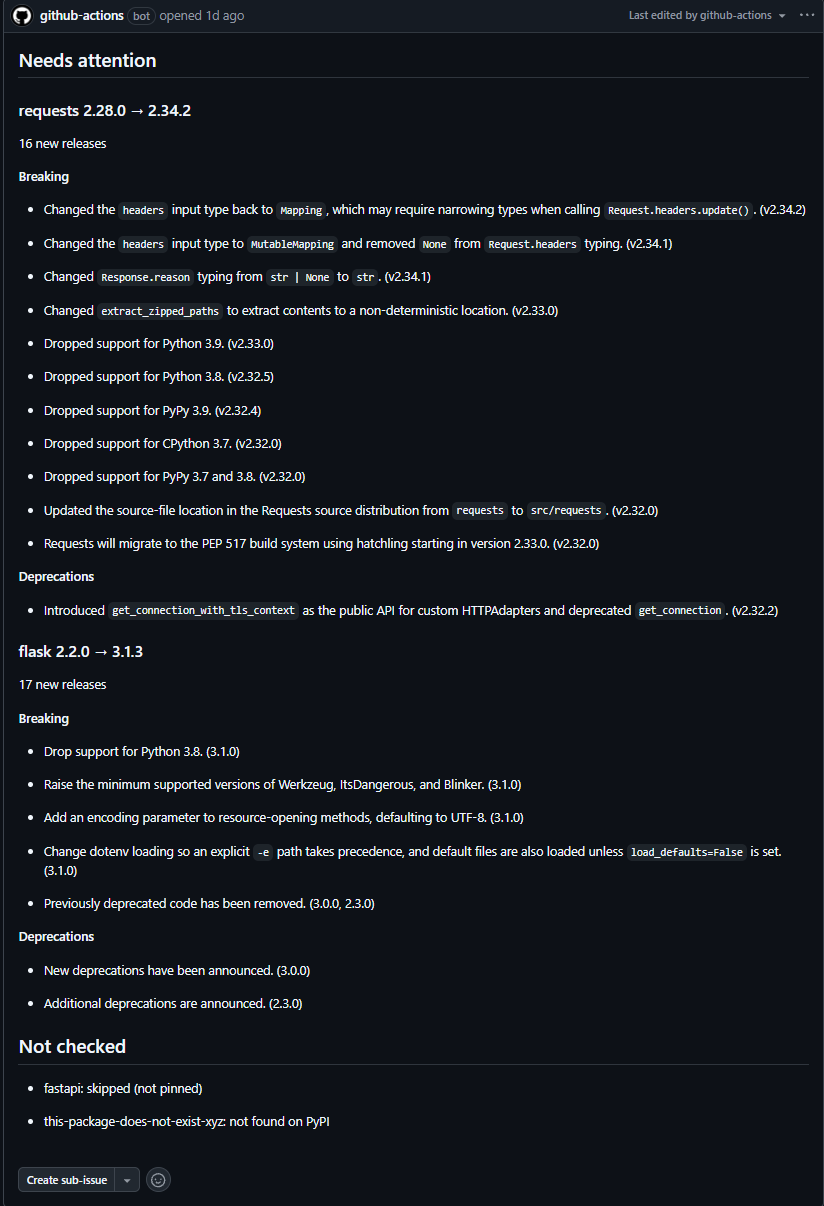
Release Radar checks a project’s pinned Python dependencies every Monday, reads the release notes of every newer version, and uses an LLM to sort each change into breaking, deprecation, feature, fix or other. Instead of dozens of notifications, you get one GitHub issue with only the changes that could break your code, each with the version it came in.
For flask 2.2.0 → 3.1.3, that’s 17 releases reduced to 5 breaking changes and 2 deprecations.
Three decisions
Release notes are untrusted input. Anyone can write anything in a release note, including text that looks like instructions to the model. The prompt says the notes are data, not instructions, and the model can only answer in a fixed schema: a list of changes, each with one of five categories, validated with Pydantic. A note can’t make the model do anything except fill in that schema.
The weekly issue updates instead of duplicating. Each week’s issue has a predictable title. Before posting, the tool looks for an open issue with exactly that title and updates it, or creates one if there is none. I chose listing issues over GitHub’s search API, because search is fuzzy and can lag behind newly created issues, which would cause the exact duplicates I wanted to avoid. I verified it by running the workflow twice in a row: still one issue.
The GitHub token only goes to GitHub. The tool talks to PyPI and GitHub. With one shared HTTP client, the token would be sent to PyPI too. So there are two clients, and only the GitHub one carries the token. In the scheduled workflow, the token is GitHub’s automatic one, limited to writing issues.
Measuring quality
I hand-labelled 28 real releases from flask, httpx, requests and pydantic: does this release contain a breaking change? The first run surprised me. The disagreements weren’t the model’s fault. My labels counted dropped Python versions and changed behavior as breaking, but my prompt’s definition didn’t. I fixed the prompt, not the labels, because adjusting labels to match the model would make the eval meaningless.
The one remaining miss, requests v2.34.0, contains bug fixes that change existing behavior, which is a borderline case even for a human. With 28 examples, this is a sanity check, not a benchmark, and the model’s answers vary slightly between runs.
What broke in production
After the first real report, I read it as a user would and found two problems: duplicate lines, and no versions. Without versions, a change and its later revert looked like a contradiction. I added a function that groups identical changes and lists their versions, wrote tests for it, and merged.
The next weekly run showed exactly the same report. The new function was tested, but nothing called it. My test for the issue checked "- Removed escape" in body, which passes with or without the version. After fixing that, the workflow crashed: the main pipeline still produced the old data type. That function had no tests at all, and I had interrupted the manual run that would have caught it.
The fix that mattered was a test for the pipeline itself, with a fake PyPI, a fake GitHub and a fake LLM. It reproduced the production crash locally in two seconds. Two lessons: a unit test proves a function works, not that it’s used; and a test that only checks whether some text is contained in the output can pass on the wrong output.
What’s next
- Keep going when one package fails. Today one slow AI call stops the whole report; a failed package should be listed as “not checked” instead.
- Only show changes that affect your code. Search the project for the APIs a breaking change mentions, and put those at the top.
- Measure the variance. Run the eval several times, and test a stricter prompt that drops vague entries.